This article will discuss the scanner class in Java with some examples and illustrations. Once you know the basics of programming, the time comes for a developer to work with novice programs in text mode (console).
Many begin using the scanner class, precisely because it facilitates the data input in the console. Java 5 introduced this class. Before then, creating programs that received variable values in Console mode was difficult.
Java Scanner Concept
For many, the Scanner class’s meaning is often complicated and difficult to understand in the beginning. With time and effort, however, the programmer can come to understand the definition. A simple text scanner parses primitive types and Strings using regular expressions.
The class Scanner aims to separate the entry of text into blocks, generating the known tokens, which are sequences of characters separated by delimiters by default corresponding to blanks, tabs, and newline.
With this class, you can convert text to primitives. The texts are considered objects of type String, InputStream, and files.
- What is a transient keyword in Java?
- How to use ByteBuffer in Java?
- Using Lambda Expressions of Java 8 in Java FX event handlers
Java Scanner In Practice
Importing the Scanner class in Java
Firstly, you need to know the functions and features of this class. When using the Scanner class, the compiler will ask you to do the following imports:
[java]
import java.util.Scanner;
[/java]
Declarations Scanner
As described in the introduction, this class assists in reading data. The example below shows how to use the Scanner object.
It is necessary to create an object of type Scanner and then an argument of object System.in to the Scanner constructor, as follows:
[java]
package net.javabeat;

import java.util.Scanner;

public class TestScannerDeclaration {
	public static void main(String[] args) {
		// Read from the command line
		Scanner sc1 = new Scanner(System.in);
		String textString = "Manisha Patil";
		// Read from a String
		Scanner sc2 = new Scanner(textString);
	}
}
[/java]
Count tokens in the string
Now that you have created your scanner class, focus on learning to read the data. The example below illustrates that we need to iterate through each token in the input to read data.
[java]
package net.javabeat;

import java.util.Scanner;

public class CountTokens {
	public static void main (String [] args) {
        int i = 0;
        Scanner sc = new  Scanner(System. in );
        System.out.print("Enter some text:" );
        while (sc.hasNext()) {
            i++;
            System.out.println("Token:" + sc.next ());
        }
        sc.close(); // End of program
    }
}
[/java]
The object System.in takes the input that you type from your keyboard.
Methods of class Scanner
Below are some of the main methods that can be invoked based on the input data type. For each primitive, there is a method call to return the value of the input data type.
[java]
Scanner sc = new  Scanner(System.in);

float numF = sc.nextFloat();
int num1 = sc.nextInt();
byte byte1 = sc.nextByte();
long lg1 = sc.nextLong();
boolean b1 = sc.nextBoolean();
double num2 = sc.nextDouble();
String name = sc.nextLine();
[/java]
Demonstration of InputMismatchException
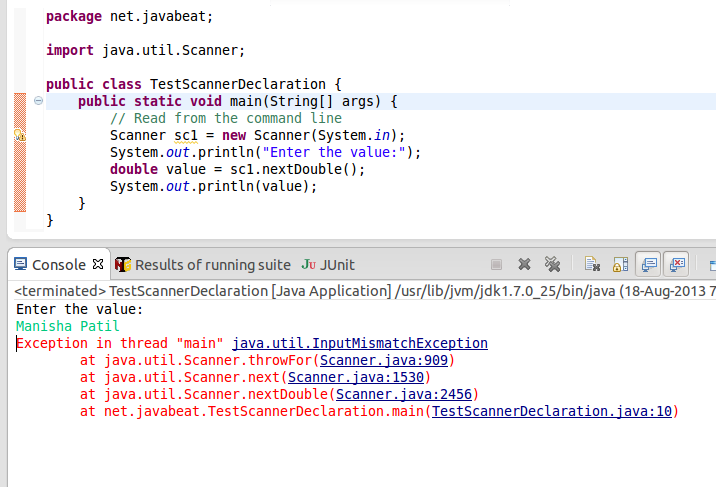
The class Scanner reads data as command line arguments. Therefore, it is always a good practice to use try/catch. Try/catch helps you avoid the exceptions caused by the wrong data type entry.
For example, in the below image, you can see that the incorrect data type entry causes an exception. The method was expecting a data of type Double.
Scanner Class Methods
Below is a list of some of the main methods of the Scanner class.
- close(): Closes the current scanner.
- findInLine(): Attempts to find the next occurrence of the specified pattern ignoring delimiters.
- hasNext(): Returns true if this scanner has another token in its input.
- hasNextXyz(): Returns true if the next token in this scanner’s input can be interpreted as an Xyz in the default radix using the nextXyz() method. Here Xyz can be any of these types: BigDecimal, BigInteger, Boolean, Byte, Short, Int, Long, Float, or Double.
- match(): Returns the match result of the last scanning operation performed by this scanner.
- next(): Finds and returns the next complete token from this scanner.
- nextXyz(): Scans the next token of the input as an Xyz where Xyz can be any of these types: boolean, byte, short, int, long, float or double.
- nextLine(): Advances this scanner past the current line and returns the skipped input.
- radix(): Returns the current index of the Scanner object.
- remove(): The implementation of an Iterator does not support this operation.
- skip(): Skip to the next search for a specified pattern ignoring delimiters.
- string(): Returns a string representation of the object is a Scanner.
Example
Take a look at this full-fledged example of what to with the Scanner class.
The classes IndividualScannerTest and Person use object-oriented programming (OOP). OOP aims to show object manipulation. Methods setters (setAttributeName) keeps the value entered. The values are then used to generate the output of each object created in the list.
[java]
package net.javabeat;

public class Person {
	private Integer code;
	private String name;
	private String address;
	private Integer age;

	public Integer getCode() {
		return code;
	}

	public void setCode(Integer code) {
		this.code = code;
	}

	public String getName() {
		return name;
	}

	public void setName(String name) {
		this.name = name;
	}

	public String getAddress() {
		return address;
	}

	public void setAddress(String address) {
		this.address = address;
	}

	public Integer getAge() {
		return age;
	}

	public void setAge(Integer age) {
		this.age = age;
	}

	@Override
	public String toString() {
		return "code:" + code + "" + "\n" + "Name:" + name + "" + "\n"
				+ "Address:" + address + "" + "\n" + "Age:" + age + "\n";
	}
}
[/java]
The class IndividualScannerTest shows that several Person objects can be stored in a list and later printed.
Take a test, insert two or more entries, and then choose option 2. All Person objects stored in the list will be printed.
[java]
package net.javabeat;

import java.util.ArrayList;
import java.util.List;
import java.util.Scanner;

public class IndividualScannerTest {
	public static void main(String[] args) {
		peopleData();
	}

	public static void peopleData() {
		Scanner sc = new Scanner(System.in);
		Person person;
		List<Person> personList = new ArrayList<Person>();
		int option = 0;

		do {
			System.out.println("# # Choose one of the options below # #");
			System.out.println("Option 1 - Enroll people");
			System.out.println("Option 2 - Print people registered");
			System.out.println("Option 0 - Exit program");
			System.out.println("_______________________");

			System.out.print("Enter your choice here:");
			option = Integer.parseInt(sc.nextLine());

			if (option == 1) {
				// Create a new object
				person = new Person();

				System.out.print("Enter code:");
				person.setCode(Integer.parseInt(sc.nextLine()));

				System.out.print("Enter the name:");
				person.setName(sc.nextLine());

				System.out.print("Enter the address:");
				person.setAddress(sc.nextLine());

				System.out.print("Enter the age:");
				person.setAge(Integer.parseInt(sc.nextLine()));

				System.out.println();

				// Holds the person object in a list.
				personList.add(person);
			} else if (option == 2) {
				if (personList.isEmpty()) {
					System.out
							.println("There are people registered, press any key to continue");
					sc.nextLine();
				} else {
					System.out.println(personList.toString());

					System.out.println("Press one key to continue.");
					sc.nextLine();
				}
			}
		} while (option != 0);

		sc.close();
	}
}

[/java]
Reading data from a file
In the previous example, we read data from the command line. If the data is large, it is better to store it in a file and then read the data from the file. Let us see an example of how to read data from a file using Scanner class.
[java]
package net.javabeat;

import java.io.File;
import java.io.FileNotFoundException;
import java.util.Scanner;

public class ReadFile {
	public static void SpeakIt(String fileName) {
		try {
			File file = new File(fileName);
			Scanner sc = new Scanner(file);
			while (sc.hasNext()) {
				System.out.print(sc.nextLine());
			}

			sc.close();
		} catch (FileNotFoundException e) {
			e.printStackTrace();
		}
	}

	public static void main(String[] args) {
		SpeakIt("samplefile.txt"); // change the path of the desired file.
	}
}

[/java]
Further Reading:
We worked through some basic concepts of Scanner class in Java. Programmers use the scanner class in Java to read data from a command line input, or a file system.
If you are interested in receiving future articles, please subscribe here. Follow us on @twitter and @facebook.
 IntelliJ vs Eclipse: Which To Use For Java Development