Programming languages like Java use variables to store the data. Developers declare/create each variable with a specific data type, and it consumes memory accordingly. In Java, it’s crucial to check the variable type while performing logical operations. For instance, when comparing data stored in different variables, ensuring compatible data types is essential. Performing logical operations on variables of different types without proper type checks or conversions leads to errors.
Therefore, Java experts recommend checking the variable’s type before executing any task in Java. This practice helps avoid unexpected errors. This write-up illustrates various methods to check the variable type in Java.
How to Check Variable Type in Java
To check variable types in Java, you can use the methods like “getClass().getName()”, the “instanceof operator”, “getClass.SimpleName()”, or the isInstance() method. Let’s learn these methods with examples.
Method 1: How to Check/Get Variable Type Via getClass().getName()
The getClass() is a built-in method of Java’s Object class. This method is executed along with the getName() method to check the variable type. The “getName” method retrieves the name of an entity, which can be a class, interface, method, enum, etc. The “getClass().getName()” method retrieves the full class name along with the package name. You can utilize this method in your Java code via the syntax:
var.getClass().getName();
Replace the “var” with a variable whose type you want to check.
Example: Check Type of Variable Using “getClass().getName()”
In this code, we declare several variables and initialize them with different values:
package exp;
import java.time.LocalDate;

public class CheckTypeJava {
  public static void main(String[] args) {
    String var1 = "Welcome To Java Beat";
    Integer var2 = 2024;
    Double var3 = 12.2024;
    Float var4 = 2023.12f;
    LocalDate var5 = LocalDate.now();
    CheckTypeJava obj = new CheckTypeJava();

    System.out.println("The Type of "+ var1 + " : " + var1.getClass().getName());
    System.out.println("The Type of "+ var2 + " : " + var2.getClass().getName());
    System.out.println("The Type of "+ var3 + " : " + var3.getClass().getName());
    System.out.println("The Type of "+ var4 + " : " + var4.getClass().getName());
    System.out.println("The Type of "+ var5 + " : " + var5.getClass().getName());
    System.out.println("The Type of obj : " + obj.getClass().getName());
  }
}
We use the “getClass().getName()” method with the declared variables to find the types of respective variables. The below output demonstrates that the stated method retrieves the class name (to which the given variable belongs) along with the package name:
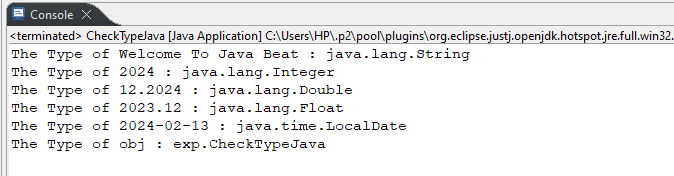
If you don’t need the package name, use the getSimpleName() method instead of getName().
Method 2: How to Check/Get Variable Type Via getClass().getSimpleName()
The getSimpleName() method works similarly to the getName() method. The only distinction is that it retrieves the class name only (without the package name). To execute this method in your program, follow the syntax:
var.getClass().getSimpleName();
Example: Check Type of Variable Using “getClass().getSimpleName()”
In this example, all the code remains the same as in the previous section; the only difference is we replace the getName() method with the getSimpleName():
package exp;
import java.time.LocalDate;

public class CheckTypeJava {
public static void main(String[] args) {
String var1 = "Welcome To Java Beat";
Integer var2 = 2024;
Double var3 = 12.2024;
Float var4 = 2023.12f;
LocalDate var5 = LocalDate.now();
CheckTypeJava obj = new CheckTypeJava();

System.out.println("The Type of "+ var1 + " : " + var1.getClass().getSimpleName());
System.out.println("The Type of "+ var2 + " : " + var2.getClass().getSimpleName());
System.out.println("The Type of "+ var3 + " : " + var3.getClass().getSimpleName());
System.out.println("The Type of "+ var4 + " : " + var4.getClass().getSimpleName());
System.out.println("The Type of "+ var5 + " : " + var5.getClass().getSimpleName());
System.out.println("The Type of obj : " + obj.getClass().getSimpleName());
}
}
The output shows that var1 is of type string, var2 is integer, var3 is double, var4 is float, and var5 is of type LocalDate. While the obj belongs to the user-defined CheckTypeJava class:

Important: We can only call the getName() and getSimpleName() methods on objects. We can’t call them on primitive data types like int. To do that, we need first to cast the primitive types to the object, as shown in the following example:
package exp;
public class CheckTypeJava {
public static void main(String[] args) {
int var = 1272;
System.out.print("The Type of given Variable is: ");
System.out.println(((Object) var).getClass().getSimpleName());
}
}
The output ensures the successful execution of the stated method:

Method 3: How to Check/Get Variable Type Via instanceof Operator
The instanceof is an effective and convenient operator that checks if a variable belongs to a specific type or not. It retrieves one of two boolean values: True or False. To use this operator in Java, you need to follow the syntax:
var instanceof dataType;
Where “var” is a variable to be checked and “dataType” represents a data type. The given variable will be checked against the specified data type and a boolean output will be retrieved.
Example: Check the Type of Variable Using instanceof
In this example we create a variable and initialize it with the string “Welcome to Java Beat”:
package exp;

public class CheckTypeJava {
public static void main(String[] args) {
String var = "Welcome To Java Beat";
if (var instanceof String)
{
System.out.println("The Given Variable is of Type String");
}
else {
System.out.println("The Given Variable is Not a String");
}
}
}
We use the instanceof operator to validate if the given variable is of type “String”. On successful execution of the code, we get the following output on the console:

Method 4: How to Check/Get Variable Type Via isInstance()
The isInstance() method of the “Class” class works similarly to the instanceof operator. However, it is recommended to use the isInstance() method if you are supposed to check the variable type at runtime. To implement this method in Java, you must follow the below syntax:
className.class.isInstance(var)
This will check if the variable “var” belongs to the class “className”.
Example: Check the Type of Variable Using instanceof
In the following code, we declare a string and store it in the variable “str”:
package exp;
public class CheckTypeJava {
public static void main(String[] args) {
String str = new String("welcome to javabeat.net");
boolean result = String.class.isInstance(str);
System.out.println(str + " is String? " + result);
}
}
We use the isInstance() method on the given string to check if it is of type “String” and store the result in a boolean variable “result”. Finally, we print the result on the console via the method “println()”:

This sums up all the possible methods of checking variable types in Java.
Frequently Asked Questions
In this section, we will address some questions about variable types that we observed Java users asking on different forums:
How to Use typeOf Operator in Java
The typeOf operator doesn’t exist in Java. However, nothing to worry about as you can achieve the same functionality using the “isInstance()” method, “instanceof” operator, “getName()” method, and “getSimpleName()” method.
How to Check the Type of Null in Java
You can use the isNull() method in Java to check if the given object is null or not.
How to Check if an Object is an Integer, a String, or a Boolean in Java
You can use the “instanceOf” operator or “isInstance()” method with the conditional statements to check if the given object is an Integer, String, or Boolean.
Final Thoughts
To check variable type in Java, use the “isInstance()” method, instanceof operator, “getClass().getName()” method, or “getClass().getSimpleName()”. The getName(), and the getSimpleName() methods retrieve the name of the entity to which the specified variable belongs. The difference is getName() retrieves the entity name alongside the package name while getSimpleName() simply returns the entity name. While the isInstance() method and instanceof operator retrieve a boolean value: True or False. In this Java guide, all these methods are explained practically with respective output snippets.
