This example shows how to count the number of files in a folder. File class defines a method list() which returns the array of file names in the directory. By getting the length of that array would mean the number of files in the folder. Lets look at the simple example. CountFilesExample.java
How To Open Word Document In Java
This example shows how to open a word document using Java. If you are working with tools where you have to open the document by clicking on it, you can use the java.awt.Desktop API to easily open the document by passing the file object. Note that this API will open any document passed into the …
How To Resolve java.lang.IllegalAccessException
This example shows when the java.lang.IllegalAccessException is thrown in your application. When an application tries to reflectively create an instance (other than an array), set or get a field, or invoke a method, if that method is not accessible to your application (probably the modifier is private or not accessible one), then your application will …

How To Compress Image Using Java
Compression of image file is one of the important task when it comes to save the large number of image files. It saves lot of space if you could compress the images when it is necessary. This example demonstrates how to compress the the JPEG file and reduce the size. ImageWriteParam class is mainly used …
How To Get Image Format Using Java
Java provides the ImageIO to work with image files. This example demonstrates how to get the type or format of the image file. It is necessary to know the type of the file when you are processing the images. Java has ImageReader which stores the type of image file. One image can have more that …
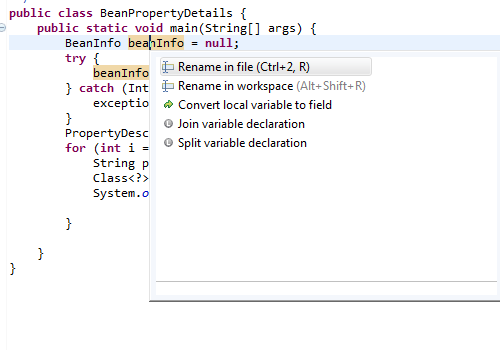
Eclipse Tips : Rename Variable (ALT + SHIFT + R)
Eclipse provides cool short cut key for renaming the variables across within a class or entire workspace. If you are not aware of this feature, you would use “find” option and replace the variable with new name. But, this will lead to a problem of not renaming all the references. You can easily rename the …
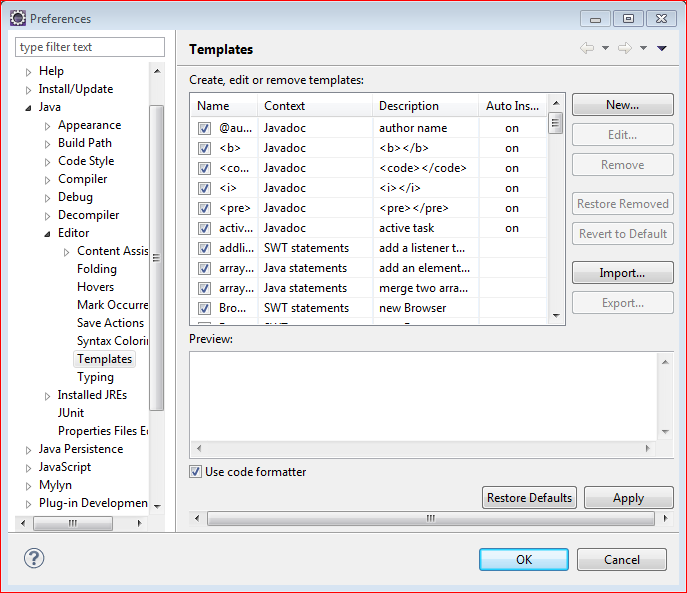
Eclipse Tips : How To Create Custom Code Template In Eclipse
One of the awesome feature in Eclipse is to create the custom code template to insert on the appropriate context. For example, there is default for loop template is exist in the Eclipse IDE, if you type for and press CTRL + SPACE, it would insert the complete for loop syntax with the condition. This …

Eclipse Tips : How To Add Server In Eclipse
This example illustrates how to add the server instance using the server wizard in Eclipse. One of the greatest advantage of using the IDE’s like Eclipse is that developers can use the server instances inside the editor itself without leaving the Eclipse environment. Eclipse itself supports the multiple server adapters to easily integrate the server …